Showing posts with label roadmap. Show all posts

Sunday, July 26, 2026

[MusicViz] Spectrochrome Update - Pitches Detected Pane

Had a really productive day and a half on my "Spectrochrome" project again after a 2 week hiatus!

(Apart from running out of steam, I was probably starting to stretch a bit too much on top of still having my day job and/or trying to get some "non-computer-based relaxing/life-living time" in...  And with no external pressures on what should and is largely still an actual fun hobby project, a break was indeed in order!)

Anyway, I finally got back to doing some "new" stuff again, after getting really worn down trying to get that massive colormaps refactor MVP stage sufficiently complete that I could shove it out the door, and not have to deal with the rest of the annoying + HARD problems requiring further intricate refactoring work for a while. Some of the highlights were:


* 1) Got a new "About" / Help-Text panel set up

(Don't read too much into this text in the screenshot just yet! :P  It's still really just a roughly thrown together wad of fluff to have at least *something* - which I've since begun the interminable process of gradual refinement on...)
 

* 2) Also bashed together some stuff to show a floating panel containing details of all the detected notes and their intensities... 

(This was one of the big outstanding features on my roadmap / todo-list, as I needed a faster + more interactive way to see this data, without having to first export it to a CSV file that I then needed to bring into some other tool to read..)

Disclaimer:  This screenshot shows the current "incomplete" state of this - hence why all that empty space to the right of the table is very much needed + justified. Specifically, there's a bunch more work to come soon to show what other contenders for the "strongest pitch" at that moment may be!  (This was actually the way I had the very first version working, but very soon reduced down to just the "strongest pitch", to try and bring that feature under control.  Anyway, hopefully getting this working may reveal some interesting insights!)

Another direction to take this is to try plotting these "strongest pitches" on/near the scrubber while doing the recording

   i.e. There's currently a problem with the generated videos where you can't really get a good feel for the notes that are getting hit / emitted when the scrubber hits them. I feel like we really need some visual feedback that is seen for a few frames before the sound hits and the line actually crosses the point in question to really "sell" the mapping between sounds and visualisation...  (I look forward to that, and/or trying to draw some sort of trace showing how we think the melody might be flowing between these points!


* 3) Finally, have managed to do a bit more research into how to try to graft in some "Equal Loudness Curve" support so that I can adjust the intensity that various frequencies are being visualised + processed at - Hopefully when working, this can help dampen out that pesky band between "C7 - C8" that tends to fill into a solid block of bright colour, as it seems all the other harmonics all merge/intersect + resonate at that frequency range... (along with compensating for fundmentals actually rooted at C3/C4 range always ending up triggering a detected peak an octave higher)

(Failing that / or in addition, I really should adjust the colormap to make that range more desaturated so they are play less of a role)


Friday, June 19, 2026

Projects Update - June 2026 Edition

While I've been relatively quiet here on my blog the past few weeks, "project wise", that couldn't be further from the truth!


1) Introducing "Spectrochrome" - The biggest news of course that I've finally made a great deal of progress on my MusicViz project again, for the first time in ages.  I plan to share more details about this in a dedicated post in a due course when I complete the last few major chunks of work on it, but before then, here's a brief sneak peak of what's been brewing:


Live link to the latest stable version:

 https://aligorith.github.io/musicviz_playpen/spectrochrome.html

What you have here, is a web-based spectrogram tool (built as a single-page tool, that runs completely in your browser on your own machine, using HTML5 technologies), that analyses any audio clip you throw at it (*1), renders each frequency / pitch with a unique colour (i.e. based on the colour scale I covered in the first edition of this series) using a "showcqt" like visualisation, and tries to figure out what the "dominant" pitch at any point is (so that we can then use that in future to drive the "next-step-up" visualisation that will try to do something with the main melodic line detected...

Other stuff it supports (but not really shown in that screenshot) includes:

 * Being able to playback and scrub the audio

 * Being able to render out a video of the spectrogram being progressively drawn as the audio plays

 * A bunch of interactive  adjustment + tweaking tools (i.e. these are some of the active areas of development currently under way)


 (*1)    Disclaimer:  It works best for short clips (about 1 - 1.5 minutes in length) - which are the typical ones it is designed to handle (i.e. that's the length of almost all the music I write + record, which is why I need this tool). I can however be used on standard pop-song like songs too (though the processing runs a bit longer, and the longer timeline means that fine details get horizontally compacted / compressed, making any melodic line features less legible.

Monday, April 27, 2026

Linux Migration Experiments - First Attempt with Desktop 1, and Hardware Upgrade Roadmap Thoughts

Having previously tried with Desktop 2, and on the back of recent success with CodeQuest Laptop, I finally decided to try and brave testing Linux on Desktop 1 for the first time ever, to see how it would fare. 

After all, as soon as I am forced to take it off Windows 10 (if something sufficiently bad comes along that means that all old machines absolutely need to be taken off the internet immediately - and even then, I can buy some more time by just disconnecting its USB wifi dongle (more on that in a moment), then it'd be good to know that I can safely do this with that machine.

Of course, there's a LOT of water to pass under the bridge with this one first... As in - tons of hardware upgrades + tweaks first (which may be somewhat familiar from prior posts in this series). 

This update covers two things:

* 1) The immediate future hardware-upgrade needs of this system, which are still up in the air somewhat

* 2) Tonight's "failed" first experiment running it under Linux 

Tuesday, February 10, 2026

Moar Crazy Project Ideas: Mastodon Archives / Live-Feed, and Personal "Boss Mode" Dashboard

As if my current projects slate wasn't full enough, I did admittedly spend some time this weekend thinking how nice it would be to have a few other little utilities to solve a bunch of problems I don't currently have nice solutions for.

    1) A Mastodon Archives/Live-Feed viewer - Mainly for searching for past posts (and/or managing ones you no longer want to keep up) - e.g. to extract a bunch to a blog post for easier access in future (e.g. similar to how this post came about).

    2) A personal "boss mode" ish dashboard screen that can be launched with a single keypress, and can be used to put up a placeholder / dashboardy type screen that allows monitoring a whole bunch of feeds = info that you'd like to keep an eye on, while you step away from your machine OR are interrupted (and/or don't want others to look at what you were doing)... Sort of like the lock screen, but more fully featured, and maybe also a bit like the  


Now, both of these "ideas" aren't really something I plan to go "all in" on. But, having had the thought, they are tempting enough to at least toy around with to see if I can clobber together some prototypes (or at least draft designs) - as a bit of an "itch scratching" exercise in creativity.  Whether I ultimately built these properly for my own use (or even for others) is moot... it's likely I won't get that far, as these are not really priorities!  But still, it's fun to tinker with!


Saturday, January 3, 2026

MediaSlurper - Phone Data Archiving Tools

Mwahahaha... had very productive hacking session yesterday on my MediaSlurper tools  (mainly on the phone backup side)

Main Changes:
* Hacked together fancy new thing custom-op mode to make it possible to go through and selectively archive screenshots, while moving the old ones out into their own folders. 

This makes it easier to archive a whole bunch of the less important ones, then just delete them from the phone 1-2 years later to free up space

(Unfortunately, web-browser ones cannot be distinguished from the filenames alone, and will need OCR processing integration to solve later - I have a tool I can integrate, but I'd like to switch that away from Windows OCR since I'm moving away from the platform soon-ish, and need these tools to keep working)

* Hacked together another custom-op mode that only does the moving-between-directories on phone too

* Then plugged a whole bunch of cases where timeouts could bring down the ship, by wrapping all the native calls with a wrapped-API that makes it retry several times before giving up

* Then bolted on mechanism to get these custom modes to run before a nominated main mode (i.e. so the "main / fixed" one won't double-capture these files)


Sunday, September 7, 2025

MediaSlurper Updates - Ep 3 - Multi Device Support

It's been a while since I've posted any updates about my "MediaSlurper" project...

Well, that's largely a good thing! Given that it was built as a personal tool to solve some very specific bottlenecks in my data management workflows, that means that in practice, it's largely been working very well for my needs (or at least, "good enough!), which is no mean feat, given that I run it at least 3-4 times a day, almost every day!   Granted, there are a handful over "very annoying" bugs relating to the various heuristics in use to avoid making duplicate copies of anything!)... but those only happen in very specific cases that I can always manually enable escape-hatch hacks in the code to work around! 

But yeah, in general, it's been working well enough that I've been able to pause active development efforts to focus on other more pressing matters  (e.g. "Picasa Replacement Project", and/or general life stuff)


Anyway, with the recent need to start urgently investigating properly migrating from old phone to new one (NOTE: I actually made the switch early this morning, and apart from a "major heart attack / moments of sinking terror" trying to get the Whatsapp transition to transfer over smoothly), I ended up running both phones for a while, and needing to be able to use MediaSlurper with both. This lead to a flurry of activity for the past few weeks, culminating in some of the final most useful stuff only coming online today, *AFTER* I have already effectively transitioned off the old phone.... 

Nevertheless, given that I don't know when I might need this stuff again (or whether someone else might find it useful if/when I ever release this tool), I have decided to keep plugging away at it to finish the last push of new functionality that should address a bunch of other things I've found myself really needing over the past month or two.

Sunday, August 17, 2025

Picasa Replacement Project - Update 4 - Roadmap + Component Breakdown

The other day, I went through and did an initial breakdown of the components that would need to be developed as part of my "Picasa Replacement" project, in order to have a workable alternative.

I made this breakdown as a way of going in more level-headed about what exactly I was about to lock myself into (and hopefully convince myself against rashly diving into headfirst), as I was definitely getting "the itch" to just dive right in and build "just the basic photo management tool" part (i.e. "part 4", with "part 1" thrown in to have anything to show, and part 2 inevitably having to be done to before I could even contemplate setting up part 4), with the idea that the actual non-destructive image editing engine would be more of a slow burn afterwards (i.e. the exposure + colour edits would then be ported over as-time-allows, once I had the functional media management tool that I needed first)

(*) I must admit, I have also been slowly digging through Darktable's source code, trying to figure out how much of the iop code can be harvested + refactored into powering the core of my own pipeline  (as some of those operations are really powerful in the ways I want, but simply using the sidecar files to pass data to it doesn't seem as viable an option as I had though, given the horrid way it handles storing state - i.e. obscure hashed / binary-dump data in the sidecar files, coupled with only the database actually having the most recent settings once it loads a file once) 

Anyway, here is the breakdown notes from my notebook, in case anyone else would like to attempt this (or join in the efforts at some point).

 (TBH:  Seeing this breakdown is and should be very sobering... It is probably a decent 4-5 years of man-effort - assuming semi-consistent progress at a fast rate gets made even - to get to a somewhat useful point.  Hence why I wouldn't really recommend anyone attempts this on a whim!) 

Thursday, December 26, 2024

UI / App Toolkits + Frameworks - The "Missing Middle-Layer"

Over the past decade and a bit, on almost every project I've worked on, I've come to realise that there is often quite a massive gulf between what the Standard Library + UI Toolkits typically offer, and what it is that you really typically require when building anything of consequence for the real world. The problem is such that really, you end up needing to spend quite a bit of time re-inventing the following sub-systems for each project OR end up paying the tax of not having these for each and every feature you add (by effectively reimplementing them *per feature* instead, but without the benefits that having the standardised system brings).

While the initial seeds of what I'm about to discuss date back to around 2010, things really started to take shape around 2018/2019, when I first seriously started mooting the idea of maybe creating my own Programming Language / Environment someday (i.e. "Kea"), a batteries-included environment for doing everything "my way"...

One of the key aspects of that language would be that the following functionality / capabilities would end up being "baked" into the language as first-class citizens. Before fully embarking on that journey again, I thought it would be good to first prototype these systems in other environments where they may help advance the overall state of the software industry. Hence this blog post.


The Short List - Core Functionality:

* 1) Property Metadata System  (i.e. something like Blender's "RNA" system)

* 2a) Bidirectional Property Binding (Data Objects <-> UI Widgets)

* 2b) Widget / Factory that creates standard auto-bound widgets, given only the Property ID + host object reference  (i.e. something like Blender's UI widgets)

* 3) Automatic hierarchical property serialisation system  (i.e. something like Skyline-X's Preference Sets)

* 4) Version patching  (i.e. something like what is used for Blender's SDNA system)

   * Includes utilities related to version number management and/or Git branch/revision info

* 5) System for Physically-Based Unit Handling and/or Unit Conversions


The Short List - Extended Functionality:

* 6) Static/Dynamic Expressions / Drivers, Expression-Evaluation, and/or String Template Substitutions

* 7) A "Datablocks" System + CRUD API's for managing those

* 8) "User Preferences" system

* 9) "Operator"-like system (for standardised logging / error handling, undo/redo, and background-exec of expensive long-running-processes) - inspired by what Blender uses since 2.5

* 10) Basic Extendable Templates/Base-Implementations for Handling the Following Functionality (Optional)

   * Standard logic for New / Load Project/ Save Project stuff

   * Standard logic for handling cache files / support data files

   * Built-in screenshot per-viewport/view-angle screenshot functionality (with repeatable / savable parametric configuration)

   * Grease Pencil / Built-in Freehand Annotation Tools

   * Node-editor 

* 11) UI Toolkit Extensions + Features

   * Collapsible Panel implementation   (Note: This is surprisingly absent from most UI toolkits in practice)

   * Control-Gain Ladders / Input Convenience mechanisms

   * Popup panels templates

   * "Overlay toolbar / interactive viewport tools" system 

   * Popup info panels / extended menus for Unit Conversions + String Templating functionality


Saturday, April 14, 2018

Future of Animation Tools - Some WIP Thoughts and Ideas (+ the Role of Pose Sculpting in All This)

As a follow-up on my earlier brief discussion about the general direction for Motion Path editing in Blender, I figured that it's probably time to outline a bit more my longer-term vision for the future of the animation tools (mainly in Blender, but also the wider animation industry at large) to give a bit more context/motivation to my earlier comments.


I had originally intended to release this all a bit later once I had a few more key pieces in place, but, inspired by Raf Anzovin's enlightening blog, Daniel M Lara's Easy Rigging stuff, the exciting developments in the VR-based animation space, and also the 2.8 code quest, I decided to put this out earlier.

In this article, I'm going to try to "throw the ball further" (as Emirates Team NZ would say) and take a more comprehensive view of where we need to going in the medium to long term, as well as what steps we can take now.

(NOTE: I originally started writing this article in NZ, but in between preparing a new laptop for travel, and travelling to/settling in Amsterdam for Code Quest, I've only had time to really work on finishing this in the past day or so).

Wednesday, December 27, 2017

Grease Pencil Dev - FAQ's, Current Status, etc.

In response to a bug report in the tracker, I ended up posting a long-ish reply that I thought would be good for more people to see, since it probably gives a bit more insight into some of the work that's going on "behind the scenes" atm. So, without further ado, here's a copy of my reply.

(For more of a user-orientated look at what functionality we've been adding, check out Antonio's code.blender.org post)

Monday, December 4, 2017

The Dr is In - PhD, BlenderDev, and Upcoming Project Updates

Woah! It's been over 2 months since I last posted anything here again :(

During that time, I've ended up being super busy with various projects/commitments (which I'll outline below). Unfortunately, this has meant that my todo list/postponed-project backlog had to take a back seat again, along with squeezing in time to write stuff here (Note: This post itself has ended up being rescheduled several times already even!). Hopefully I'll finally manage to get enough time to start making some progress on some of the things I've been wanting to do since early March (EDIT: actually, it's been since October June 2016)! Stay tuned...

Monday, March 13, 2017

Breakdowner/GP Sequence Interpolation Ideas

While working on some recent improvements for the Breakdowner, I started daydreaming (as you do, when in full feature development mode, which is one of the things I love most about this process/work ;) about some ideas for how we could make these things even more awesome than they were already.

In case you haven't kept up with the latest developments in Blender, there are now two sets of tools with Breakdowner-like functionality:
1) The Pose Breakdowner (and the related "Push" and "Relax" tools)
2) The GPencil Interpolate and Interpolate Sequence operators

This post looks into what we could do for both of these - first common features, and then stuff that's more specific to the GPencil case (since it's newer functionality, which also has heaps more room that we can explore).

Oh, and just in case/before any gets confused, THE FOLLOWING CONTENTS OF THIS POST ARE ALL ENTIRELY HYPOTHETICAL/IDEAS ONLY. There's no guarantee than any of this will be implemented, though I'm curious how well they would turn out if I did :)


Tuesday, December 29, 2015

Grease Pencil Roadmap - 2016 Plans

Wow, it's already the end of December! The year has really flown right by, and so it should when you're having fun! :)  As it's the end of the year, it's also time to do some customary "year end retrospectives". The first of these is for Grease Pencil. (There will also be another on general Animation System stuff too).


Monday, March 2, 2015

Animation System Roadmap

To compliment my earlier post on the Grease Pencil roadmap, Ton's official BF list, and the Action Management roadmap, here's a selection of the most pressing "big ticket" animation-related issues on my todo list. Do note that this is not an exhaustive list (for which there are many many more!), but it does contain at least all the main things I can remember off the top of my head.


Action Management Roadmap - 2015 Version

In response to the concerns of users in the community (yes, we year you! Loud and clear :), I have ended up prioritizing looking into this, even at the expense of other even bigger issues that also need addressing.


Here is a quick overview of some of the efforts in motion now to address this matter.

Monday, December 29, 2014

Grease Pencil - Stage II Roadmap

With "Stage I" of the Grease Pencil revamps in master now, it's time to start talking about "Stage II" :) This list is currently still a very preliminary, but it should give an idea of what is planned. There may be one or two things I've forgotten off this list though...

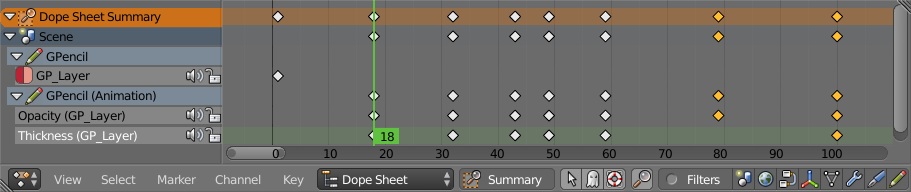
Integrated keyframes display + editing in the Dopesheet


Thursday, October 30, 2014

Grease Pencil Dev Roadmap

Since several of you have been asking, here's my roadmap/plan/todo-list of things which will be happening with Grease Pencil development in the near to short term (with the aim of release in 2.73). There are also some longer-term "wishlist" items which others are free to try picking up.